By Marco Dela Cruz · Editor-in-Chief · Last updated · Philippines
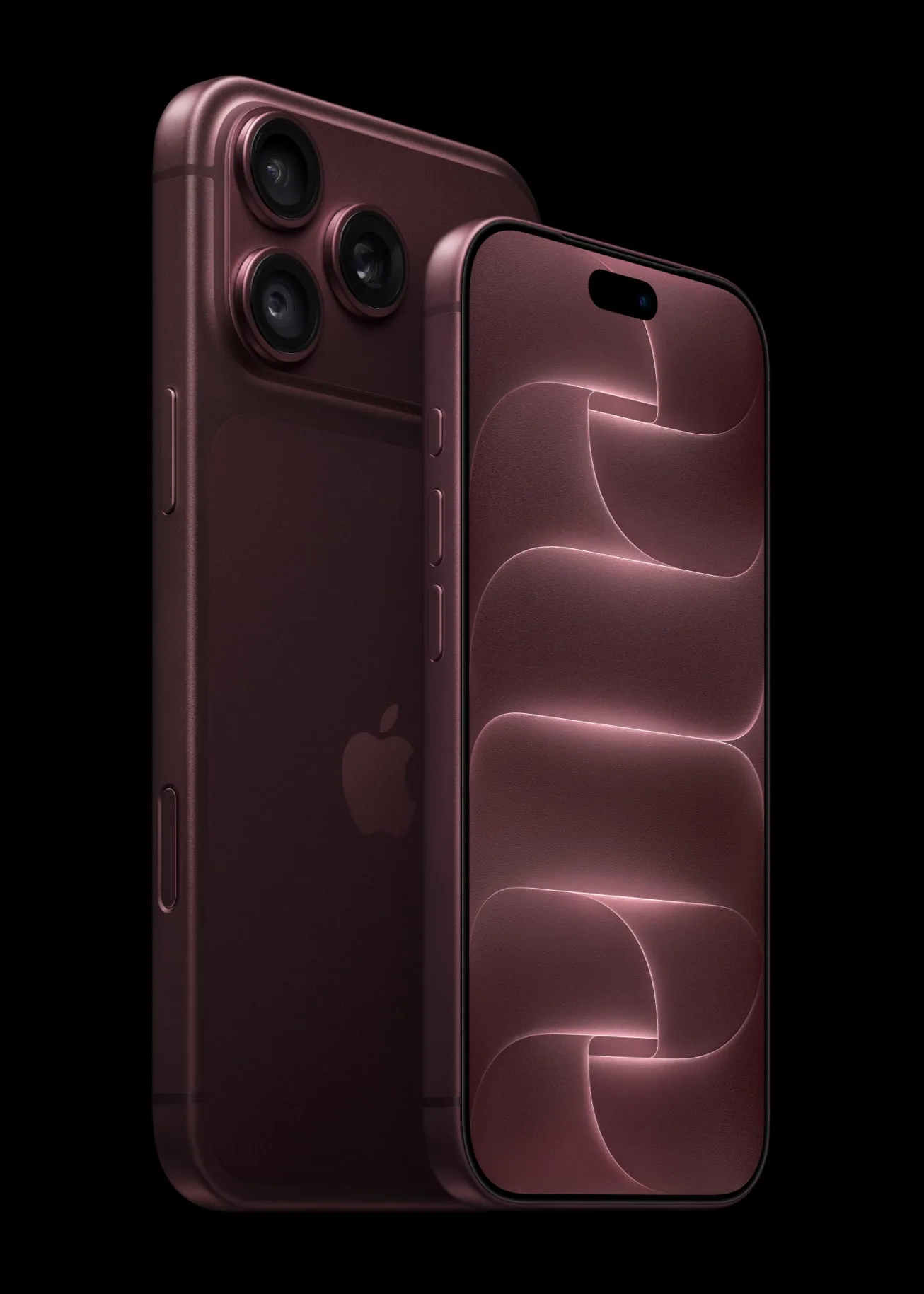
9.0/10Our ratingiPhone 18 Pro Max — official product photo, Burgundy finish showing the stock wallpaper
The iPhone 18 Pro Max ships with four stock wallpapers, one for each finish — Burgundy, Glacier, Silver and Black — and they are the most-searched iPhone wallpapers in the Philippines right now. This guide shows you the official ones, the exact size for your model, how to set one in under a minute, and where the Christmas wallpapers fit in December. One rule first: we do not host wallpaper downloads here. Apple ships the wallpapers with the phone, and this guide links out to Apple for the files — never to a wallpaper site.
Why this guide exists now: searches for “iphone 18 pro max wallpaper” in the Philippines rose from about 90 a month in July 2026 to about 1,900 in October, and “christmas wallpaper iphone” peaks every November and December. The same terms are trending on Pinterest. So this is a Christmas-window guide as much as a Google one: get the size right now, and the wallpaper still looks right in January.
How our scores work: the 9.0/10 score on this guide is our editorial rating out of 10 for how complete and dependable these wallpaper steps and sizes are for iPhone owners in the Philippines — every size and finish is taken from Apple's own tech specs pages — not a hands-on lab test score.
The official iPhone 18 Pro Max wallpapers — four finishes, one size
Apple matches each stock wallpaper to the colour of the phone. There are four, and the finishes below are the same four Apple lists on its official iPhone 18 Pro Max tech specs page — and the same four on our own iPhone 18 Pro Max specs page (from ₱99,990, 9.5/10). Every one of them is 1320×2868 pixels, the exact size of the 6.9-inch display.
Finish
Wallpaper size
Burgundy
1320 × 2868
Glacier
1320 × 2868
Silver
1320 × 2868
Black
1320 × 2868
Two versions of each wallpaper exist. The dynamic version changes with Light and Dark Mode — the same image looks different in the daytime and at night — and Apple's own support page says wallpapers marked with the Light/Dark icon change appearance when Dark Mode is turned on. The static version is one fixed image that never changes. Pick dynamic if you want the wallpaper to shift on its own, static if you want one look all day. Both are already on the phone: open Settings → Wallpaper → Add New Wallpaper and pick a preset, or long-press the Lock Screen and tap the + button. Apple's own support guide to changing the wallpaper shows the same steps.
How to set a wallpaper on iPhone
It takes under a minute, and there are two ways in — Settings, or straight from the Lock Screen:
Open Settings → Wallpaper → Add New Wallpaper.
Pick a preset (Dynamic or Stills) or one of your own photos from an album.
Pinch to zoom and drag to position the image, and turn Perspective Zoom on or off if the option appears.
Tap Set, then choose Lock Screen, Home Screen or Both.
The faster way: long-press the Lock Screen and tap the + button. The same picker opens, and you can also switch between the Lock Screens you have already made. To change a wallpaper you have already set, go back to Settings → Wallpaper and tap the Lock Screen or Home Screen image.
And on Android?
A wallpaper is just a picture, so the same image works on Android too. Long-press an empty spot on the home screen and tap Wallpaper — on Samsung and Pixel phones it is called Wallpaper & style — pick the image, then choose Home screen, Lock screen or Both. The same setting is also under Settings → Wallpaper. Use the image at your phone's full screen resolution so it stays sharp.
Christmas iPhone wallpapers for December
December is the one month of the year when people actually change their wallpaper on purpose, and the rule is the same as the rest of the year: use an image at your phone's full resolution — 1320×2868 on the iPhone 18 Pro Max — so nothing is cropped or soft. Three things make a Christmas wallpaper work on the Lock Screen:
Do
Pick a dark background — deep red, green or navy — so the white clock stays readable.
Keep the centre simple. The clock and the date sit in the top third, so the busiest part of the image belongs at the bottom.
Use the full-resolution image. A small image stretched to fill the screen looks blurry.
Don't
Use a bright or busy photo behind the clock — the time disappears into it.
Download from wallpaper sites that shrink or watermark the file. Use a photo you already own, or one of Apple's stock wallpapers in Black or Burgundy, which already suit December.
Forget to swap it back. Set a reminder for January — changing it back takes the same under-a-minute steps above.
Set it the same way as any wallpaper: Settings → Wallpaper → Add New Wallpaper, pick the image, then Set Lock Screen, Home Screen or Both. If you are buying a gift to go with it, our Christmas gift guide lists tech gifts under ₱15,000.
Wallpaper sizes by iPhone model
A wallpaper should match your screen pixel for pixel. The three Pro Max models share one size, the two 6.3-inch models share another, and the iPhone 16 is smaller again:
Model
Display
Wallpaper size
iPhone 18 Pro Max, 17 Pro Max, 16 Pro Max
6.9-inch
1320 × 2868
iPhone 18 Pro, iPhone 17
6.3-inch
1206 × 2622
iPhone 16
6.1-inch
1179 × 2556
Sizes are from Apple's own tech specs pages (iPhone 18 Pro Max, iPhone 18 Pro and iPhone 17) and our own verified spec pages (iPhone 17 Pro Max, iPhone 16 Pro Max and iPhone 16). If your model is not listed, check its resolution on Apple's tech specs page before downloading anything — a wallpaper smaller than your screen will look soft, and a larger one will be cropped.
The phone behind the wallpaper — iPhone 18 Pro Max
9.5/10The most expensive iPhone on the site — and the one these wallpapers were made for
The iPhone 18 Pro Max is from ₱99,990 in the Philippines, with a 6.9-inch display, the A20 Pro chip and a triple 48MP camera system. Our full page has the complete specs, the four finishes and the official photo — and the Apple iPhone price list has every iPhone we track, from the iPhone 11 up.
How we earn: Best Tech Asia may earn a commission when you buy through Shopee or Lazada links on this site, at no extra cost to you. The wallpapers themselves are free — they ship with the iPhone.
Need a replacement? Get your pick in 30 seconds
Answer three quick questions — budget, main use, 4G or 5G — and the Budget Finder shows the one pick we would buy with that money, with its price, score and Check price buttons.
The official iPhone 18 Pro Max wallpapers match the phone's four finishes — Burgundy, Glacier, Silver and Black — at 1320×2868 pixels. Use the dynamic version to shift with Light and Dark Mode, or the static version for a fixed look. Get them from Apple, then set one in Settings → Wallpaper.
iPhone 18 Pro Max wallpaper — frequently asked questions
Where do I get the official iPhone 18 Pro Max wallpaper?
From Apple — the stock wallpapers ship with the phone. On the phone, go to Settings → Wallpaper → Add New Wallpaper and pick one of the presets, or long-press the Lock Screen and tap the + button. Do not download them from wallpaper sites: those copies are often resized, cropped or watermarked.
What size is the iPhone 18 Pro Max wallpaper?
1320×2868 pixels, matching the 6.9-inch display (2868×1320). The same size fits the iPhone 17 Pro Max and the iPhone 16 Pro Max, which share the same 6.9-inch display resolution.
What is the difference between the dynamic and static wallpaper?
The dynamic version changes with Light and Dark Mode — the same image looks different in the daytime and at night. The static version stays the same image all day. Pick dynamic if you want the wallpaper to shift automatically, static if you want one fixed look.
How do I set a wallpaper on my iPhone?
Open Settings → Wallpaper → Add New Wallpaper, pick a preset or one of your own photos, then tap Set and choose Lock Screen, Home Screen or Both. The faster way: long-press the Lock Screen and tap the + button.
Can I use an iPhone wallpaper on Android?
Yes — a wallpaper is just a picture. Save it at your phone's full screen resolution (1320×2868 works on most big Android phones), then long-press an empty spot on the home screen, tap Wallpaper, pick the image and choose Home screen, Lock screen or Both. The same setting is also under Settings → Wallpaper.
Where do I find Christmas iPhone wallpapers?
Use any Christmas image at your iPhone's full resolution — 1320×2868 on the iPhone 18 Pro Max — and set it the same way, in Settings → Wallpaper. Dark backgrounds with a simple centre suit the Lock Screen clock best, because a busy image hides the time. Swap it back in January in under a minute.
Additional Details
Guide
iPhone 18 Pro Max wallpapers in the Philippines — the four official finishes, the 1320×2868 size, dynamic vs static, how to set one on iPhone and Android, Christmas wallpapers for December, and sizes for every recent iPhone.
Official wallpapers
Burgundy, Glacier, Silver and Black — the same four finishes Apple lists on its official iPhone 18 Pro Max tech specs page. They ship with the phone; get them from Apple, not from wallpaper sites.
Size
1320×2868 pixels on the iPhone 18 Pro Max, 17 Pro Max and 16 Pro Max (6.9-inch); 1206×2622 on the iPhone 18 Pro and iPhone 17 (6.3-inch); 1179×2556 on the iPhone 16 (6.1-inch).
Dynamic vs static
Dynamic changes with Light and Dark Mode; static stays the same image all day. Apple's support page says wallpapers marked with the Light/Dark icon change appearance when Dark Mode is turned on.
How to set
iPhone: Settings → Wallpaper → Add New Wallpaper, or long-press the Lock Screen and tap +. Android: long-press the home screen → Wallpaper, or Settings → Wallpaper.
Christmas
Use a Christmas image at your phone's full resolution, dark background, simple centre. Set it the same way, and swap it back in January.
The phone
iPhone 18 Pro Max — from ₱99,990 in the Philippines, 9.5/10. Full specs: https://besttechasia.com/iphone-18-pro-max-full-specs-price-philippines/